Page permission inheritance for Confluence
Apply a parent page’s restrictions to everything below it — after seeing, page by page, who loses access and who keeps it. Nothing is written until you say so.
Install from the Atlassian Marketplace Confluence Cloud · free up to 10 users
Confluence does not inherit page restrictions
Restricting a parent page hides its children, and that is where inheritance stops. Every other restriction — who may edit, who may see a page that is not hidden by an ancestor — has to be set page by page. On a tree of any size, that is where permissions quietly drift out of shape.
It is one of the most-voted Confluence suggestions that will not be built. CONFSERVER-5095 was closed Won’t Do in June 2020 with 939 votes behind it; its Cloud twin CONFCLOUD-5095 is still open at 969 votes and Gathering Interest. The reason Atlassian gave is the useful part:
“There wasn’t a solution that passed our high quality bar for setting restrictions that allowed users to quickly and easily make decisions and understand the impact of them.”
That sentence names the real difficulty instead of dodging it. Cascading restrictions down a tree is the easy half; knowing what you are about to do to two hundred pages is the half that stops people. Leafward is built around the second half.
Nothing changes until you have read what would change
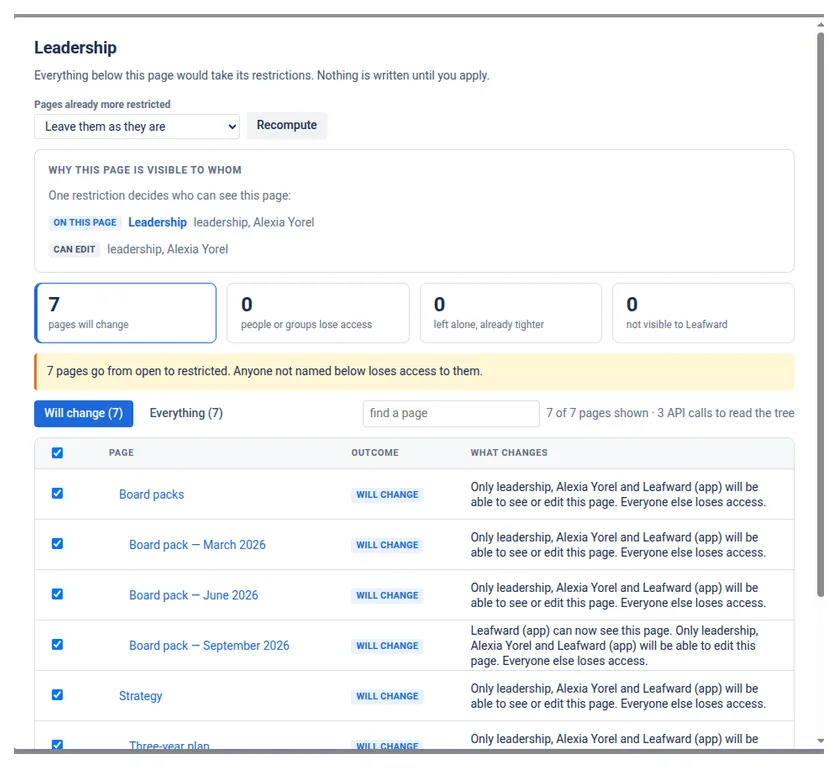
Point Leafward at a page and it reads the whole subtree at once, then states the consequences as sentences rather than as a diff:
- “Only the Legal team will be able to see this page. Everyone else loses access.”
- “Anyone with access to the space will be able to edit this page.”
Page by page, with a count of who loses what and on how many pages. Untick any page or branch before applying — an excluded page shields everything beneath it. Export the plan as a CSV headed nothing has been written and get it approved by someone who will never open the app. Then apply it, and what you saw is exactly what runs: the plan is stored and executed unchanged, never recomputed behind your back.
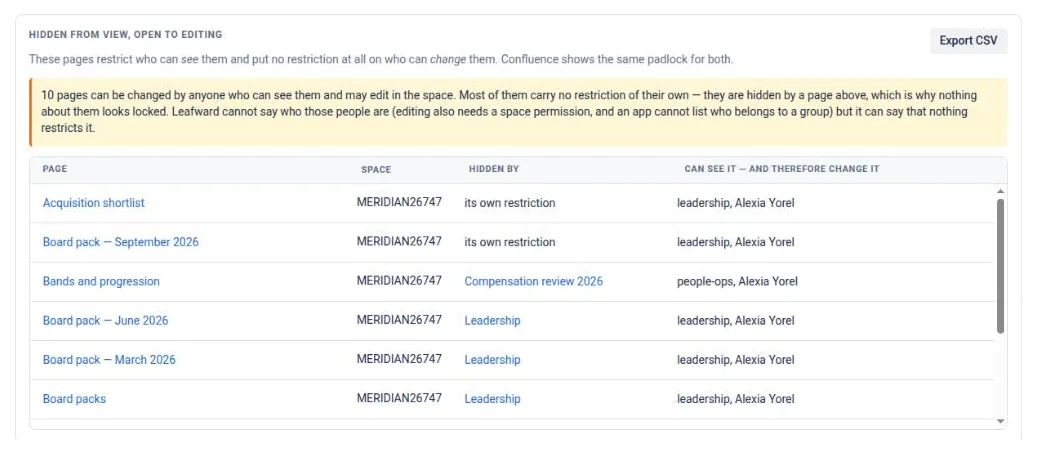
The padlock that means two different things
Confluence shows the same padlock whether a page restricts who may see it or who may change it. A page can be hidden from most of the company and still be editable by everyone who can reach it — and nothing on the page says so. Leafward tells the two apart and lists them.
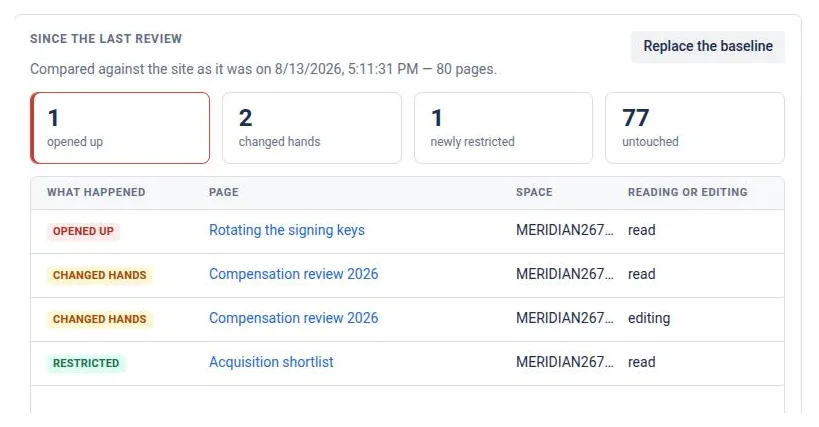
What changed since the last review
A permission report you can filter — by space, by person or group, by page title, by whether a page is restricted at all — and export as a CSV that carries the permissions themselves, not just the names of your spaces. Compared against a remembered baseline, it catches the restrictions changed by hand too, not only the ones the app made.
A page tree is not only pages
Whiteboards, databases and folders sit inside the tree and carry their own restrictions. A cascade that quietly skipped them would leave the one thing nobody thinks to check still open. Leafward reads them, counts them alongside the pages, names them for what they are, and applies to them. A whiteboard created later under a restricted page inherits like any other child.
Built to finish what it starts
Large cascades are where permission apps fail quietly: some children inherit, some do not, and nobody finds out. Leafward writes in resumable batches and keeps a journal line for every page — including the ones it deliberately left alone — so that months later a run still answers “why is this page restricted?”. It can be paused, resumed, or put back page by page.
Pages already more restricted than their parent are left alone by default, and they protect their own subtree from being widened from below. Switch to mirror mode when an auditor wants everything identical.
What it will not tell you
These are limits of Confluence, not gaps waiting to be filled, and an app that claims otherwise is guessing:
- Who is inside a group. No Confluence app can list group membership, so Leafward says what restricts a page, never who that resolves to.
- Anything you cannot see yourself. Leafward reads Confluence as the person running it, so a report never shows more than that person is allowed to see. Where it ran out of visibility it says how many pages, rather than letting a count imply there were none.
- Restrictions it is locked out of. A page restricted without naming the app is invisible to the app — it is counted as unreadable, not as unrestricted.
One consequence worth knowing before you install: Confluence refuses to write a restriction that does not include the app’s own account, so Leafward appears in the restriction lists it writes. That is the platform’s rule, and there is no way around it.
Price
Free up to 10 users, permanently — not a trial. Above that it is paid per user and billed by Atlassian with the rest of your bill; the figure for your own user count is on the Marketplace pricing tab, which is where the prices actually live.
Who makes it
I do — one person, on my own, under the name Growing Peas. There is no support desk behind this page: mail arrives at [email protected] and I answer it myself, usually the same day. If something is broken, say so plainly and I would rather hear it than not.
Leafward stores page and account identifiers, never names — display names are looked up at the moment they are shown and kept nowhere. The support page covers the built-in self-check and the behaviours that look like faults but are not.
Install from the Atlassian Marketplace Confluence Cloud · free up to 10 users