Timesheets for Jira that keep no copy of your hours
Time logged through Hourward is written straight into Jira’s own worklogs, under the name of the person who typed it. There is no vendor copy, because the app never makes one.
Jira Cloud · free up to 10 users
Hourward is in review on the Atlassian Marketplace, so there is no install button here yet. Write to [email protected] and I will tell you the day it is listed.
The copy is the problem, not the timesheet
Every other timesheet app for Jira copies your team’s hours onto its vendor’s servers. That copy is what turns a timesheet into a data-processing question: a DPA to sign, a sub-processor to register, a security questionnaire to fill in, and one more place your employees’ working patterns live.
Hourward does not make the copy. It moves Jira’s own Time spent field, it
shows up in Jira’s own reports, and it answers to Jira’s own JQL —
worklogAuthor = currentUser() finds it, because it really is theirs. The app
stores no hours, no names and no email addresses: only whether a week has been submitted
and approved, which is the one thing Jira has no place for.
It runs entirely on Atlassian’s infrastructure, in your site’s own region, and it declares no egress permission at all — which is what makes it eligible for Atlassian’s Runs on Atlassian programme, where the platform itself tells your administrators if an update ever changes that.
A week, filled in and totalled
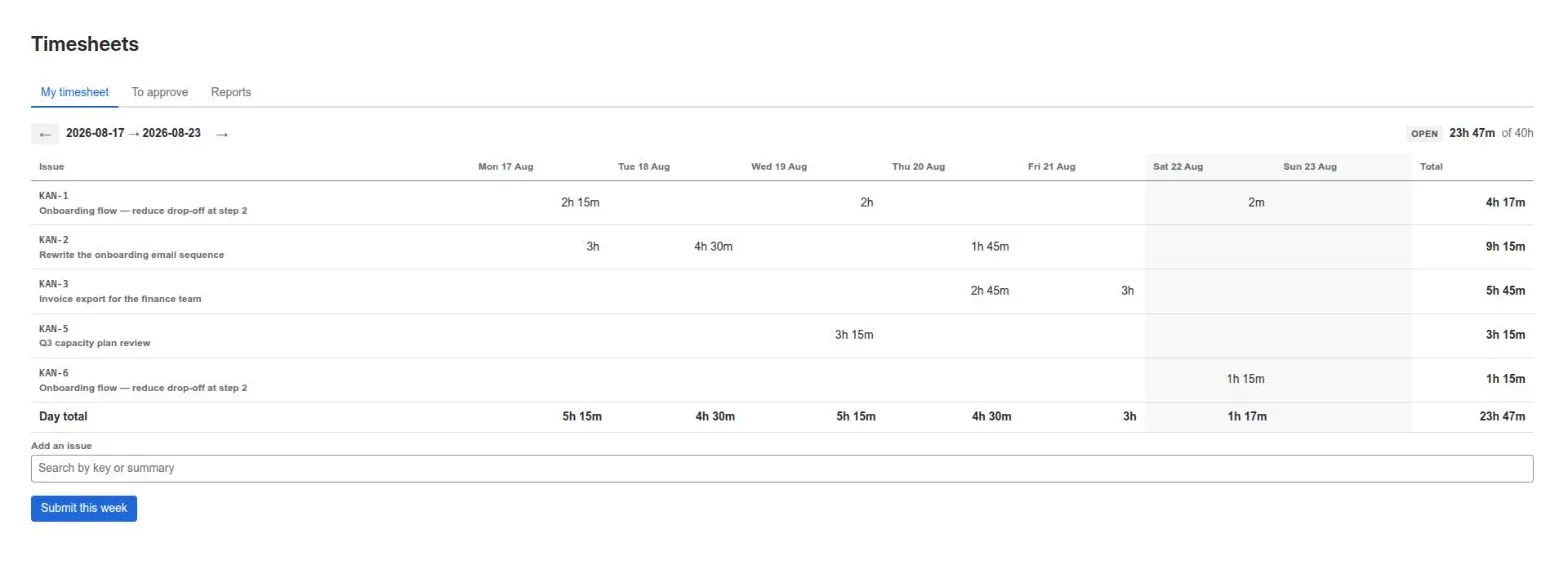
1h 30m, 1h30, 90m and 1:30 all work,
and the form shows what it understood before you commit it. Jira’s own working day
and week settings are read from your site, so “1d” means what it means to
you.
Time can also be logged from the issue you are already on, without leaving it — which is where most of it actually gets recorded.
Submitted, and approved by somebody else
A week is submitted, and a manager approves it or sends it back with a reason. Nobody can approve their own week, approver or not. Once a week is submitted or approved it is closed to Hourward’s own screens — whichever week the date you pick falls in, not just the one you are looking at.
And it will not pretend an approved week is unchanged when it is not. Jira lets a worklog be edited at any time and no app can prevent that; Hourward compares the total now against the total claimed at submission, and says when they differ.
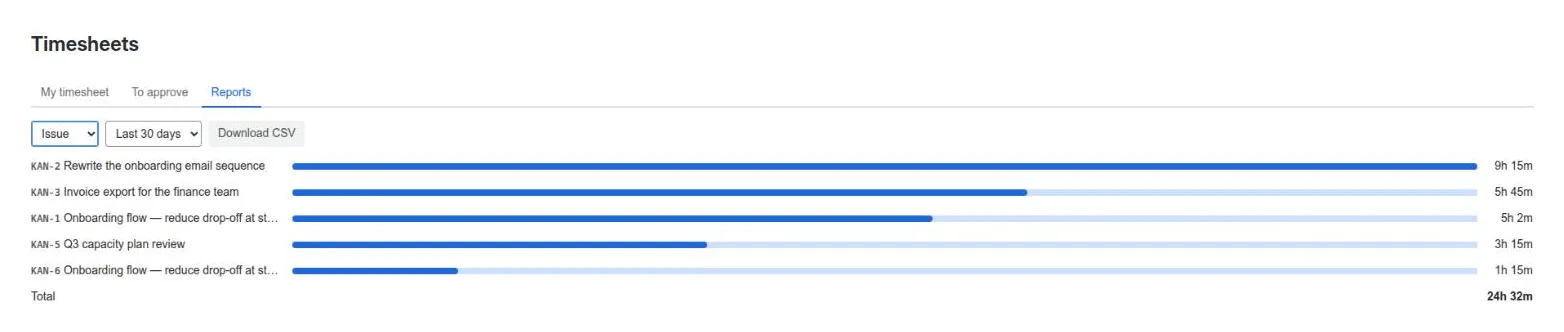
Reports, and a CSV your finance team can use
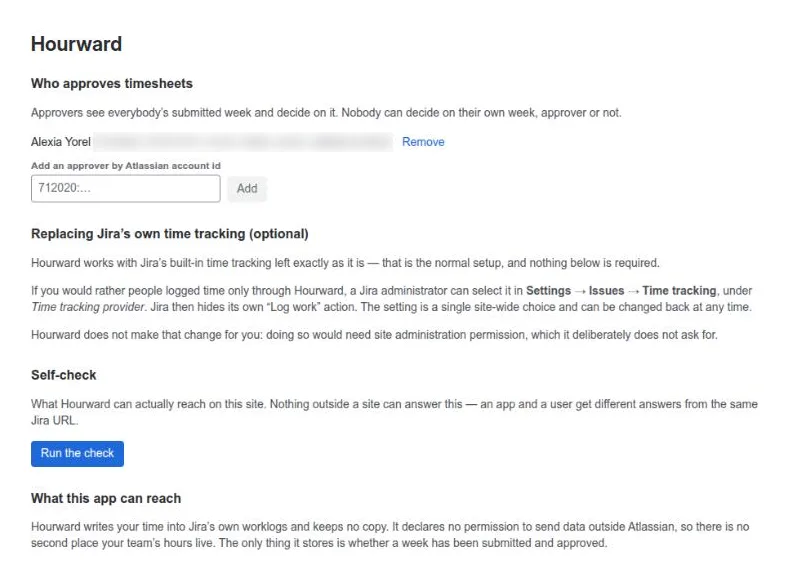
It will not touch your Jira’s settings
What it deliberately does not do
- It cannot log time on someone’s behalf. No server-side timer, no bulk import attributed to a person. Anything written without a person behind it would belong to the app rather than to them, and would then vanish from Jira’s own worklog searches. That is the defect this app exists to avoid, so it is not coming.
- It will not switch Jira’s time tracking provider for you, for the permission reason above.
- It does not import your history from another tool. Hours already sitting in a vendor’s database stay there; Hourward starts from the day you install it.
If you stop paying, you keep every hour
The screens go — Atlassian takes them, and no app can change that. The hours stay: they are in Jira’s own worklogs, in the tool you already own, and Hourward never had a copy to hand back. No export to run, nobody to ask.
Price
Free up to 10 users, permanently — not a trial. Above that it is paid per user and billed by Atlassian with the rest of your bill; the figure for your own user count will be on the Marketplace pricing tab, which is where the prices actually live.
Who makes it
I do — one person, on my own, under the name Growing Peas. There is no support desk behind this page: mail arrives at [email protected] and I answer it myself, usually the same day. If something is broken, say so plainly and I would rather hear it than not.
The support page covers the built-in self-check and the behaviours that look like faults but are not, and privacy says exactly what is stored — which is very little. Security covers how the app is built, what it can reach, and how to report a vulnerability.